> ## Documentation Index
> Fetch the complete documentation index at: https://docs.booper.dev/llms.txt
> Use this file to discover all available pages before exploring further.
# Quickstart
> Create your first scheduled job in under 2 minutes
There are a few different ways to schedule a job to execute an HTTP request:
1. In the terminal with cURL
2. In our dashboard
3. With our Node SDK
## Create your first job
Let's start by creating a job that sends a message to the Booper [Discord](https://discord.gg/pD7pnd2bUH) server in 30 seconds.
It will do this by scheduling a `POST` request to `https://scheduler.booper.dev/api/broadcast` with the `channel` field of the request body set to `"discord"`, and the `content` field set to whatever message we want to broadcast.
### In the terminal
The easiest way to do this is to copy and paste the following cURL request into your terminal.
Note that in the request body (in `--data-raw`) we simply define the HTTP `method`, `url`, `body`, and set it to run in 30 seconds with the `schedule_in` parameter:
```bash cURL theme={null}
BOOPER_PUBLIC_API_KEY='sk_public_20230921'
curl --location --request POST 'https://scheduler.booper.dev/api/jobs' \
--header "Content-Type: application/json" \
--header "Authorization: Bearer $BOOPER_PUBLIC_API_KEY" \
--data-raw '{
"method": "post",
"url": "https://scheduler.booper.dev/api/broadcast",
"body": {"content": "Just getting started!", "channel": "discord"},
"schedule_in": [30, "seconds"]
}'
```
```bash CLI theme={null}
npx @booper/cli run \
POST https://scheduler.booper.dev/api/broadcast \
--data 'content=Just getting started!' \
--data 'channel=discord' \
--in '30 seconds'
```
Note that the request above is using our [public API
key](https://www.booper.dev/g/home), which you should avoid using for anything
private or important.
### In the dashboard
After you've [created an account](https://www.booper.dev/register), you can walk through setting up your first job on the [onboarding page](https://www.booper.dev/onboarding).
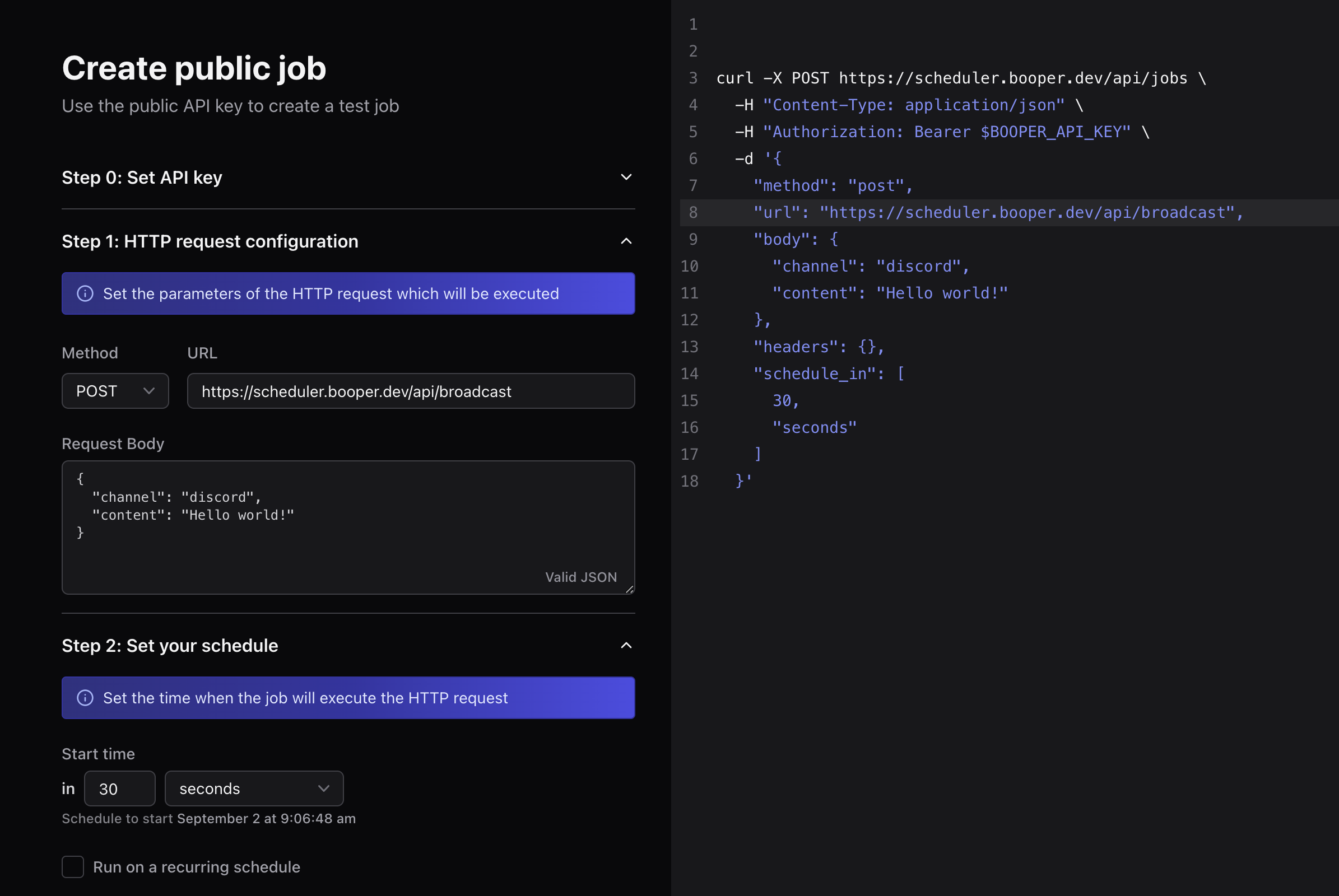 (You can also use the public API key in the public [dashboard](https://www.booper.dev/g/home) to create a job.)
### With an SDK
If you want to trigger a new job from your codebase, you can use one of our SDKs, or simply make a request to the API with the HTTP library of your choice.
Let's use our NodeJS SDK for example. First, install the `@booper/scheduler` package:
```bash npm theme={null}
npm i @booper/scheduler
```
```bash yarn theme={null}
yarn add @booper/scheduler
```
Then, in your server code:
```typescript theme={null}
import Scheduler from "@booper/scheduler";
const BOOPER_API_KEY = "sk_public_20230921";
const scheduler = new Scheduler({ apiKey: BOOPER_API_KEY });
(async () => {
await scheduler.jobs.create({
url: "https://scheduler.booper.dev/api/broadcast",
method: "post",
body: {
author: "Hacker",
content: "Hello from NodeJS!",
channel: "discord",
},
schedule_in: [30, "seconds"],
});
})();
```
## Schedule a recurring job
A recurring job is simply one that repeats at a set interval after executing for the first time. It's very similar to creating a one-off job like we did in the previous section, but with a few extra features.
Let's just create a job that pings the Booper API every 5 minutes after its initial run. It will do this by scheduling a `GET` request to `https://scheduler.booper.dev/api/ping`.
### In the terminal
Once again, the easiest way to do this is to copy and paste the following cURL request into your terminal.
The main difference with the section above is that we now add the `repeat_every` field set to `[5, 'minutes']`:
```bash cURL theme={null}
BOOPER_PUBLIC_API_KEY='sk_public_20230921'
curl --location --request POST 'https://scheduler.booper.dev/api/jobs' \
--header "Content-Type: application/json" \
--header "Authorization: Bearer $BOOPER_PUBLIC_API_KEY" \
--data-raw '{
"method": "get",
"url": "https://scheduler.booper.dev/api/ping",
"schedule_in": [10, "seconds"],
"repeat_every": [5, "minutes"]
}'
```
```bash CLI theme={null}
npx @booper/cli run \
GET https://scheduler.booper.dev/api/ping \
--in '10 seconds' \
--every '5 minutes'
```
Note that the request above is using our [public API
key](https://www.booper.dev/g/home), which you should avoid using for anything
private or important.
### In the dashboard
After you've [created an account](https://www.booper.dev/register), you can walk through setting up a recurring job on the [onboarding page](https://www.booper.dev/onboarding) or the [new job page](https://www.booper.dev/jobs/new).
Make sure to check the box to `Run on a recurring schedule`:
(You can also use the public API key in the public [dashboard](https://www.booper.dev/g/home) to create a job.)
### With an SDK
If you want to trigger a new job from your codebase, you can use one of our SDKs, or simply make a request to the API with the HTTP library of your choice.
Let's use our NodeJS SDK for example. First, install the `@booper/scheduler` package:
```bash npm theme={null}
npm i @booper/scheduler
```
```bash yarn theme={null}
yarn add @booper/scheduler
```
Then, in your server code:
```typescript theme={null}
import Scheduler from "@booper/scheduler";
const BOOPER_API_KEY = "sk_public_20230921";
const scheduler = new Scheduler({ apiKey: BOOPER_API_KEY });
(async () => {
await scheduler.jobs.create({
url: "https://scheduler.booper.dev/api/broadcast",
method: "post",
body: {
author: "Hacker",
content: "Hello from NodeJS!",
channel: "discord",
},
schedule_in: [30, "seconds"],
});
})();
```
## Schedule a recurring job
A recurring job is simply one that repeats at a set interval after executing for the first time. It's very similar to creating a one-off job like we did in the previous section, but with a few extra features.
Let's just create a job that pings the Booper API every 5 minutes after its initial run. It will do this by scheduling a `GET` request to `https://scheduler.booper.dev/api/ping`.
### In the terminal
Once again, the easiest way to do this is to copy and paste the following cURL request into your terminal.
The main difference with the section above is that we now add the `repeat_every` field set to `[5, 'minutes']`:
```bash cURL theme={null}
BOOPER_PUBLIC_API_KEY='sk_public_20230921'
curl --location --request POST 'https://scheduler.booper.dev/api/jobs' \
--header "Content-Type: application/json" \
--header "Authorization: Bearer $BOOPER_PUBLIC_API_KEY" \
--data-raw '{
"method": "get",
"url": "https://scheduler.booper.dev/api/ping",
"schedule_in": [10, "seconds"],
"repeat_every": [5, "minutes"]
}'
```
```bash CLI theme={null}
npx @booper/cli run \
GET https://scheduler.booper.dev/api/ping \
--in '10 seconds' \
--every '5 minutes'
```
Note that the request above is using our [public API
key](https://www.booper.dev/g/home), which you should avoid using for anything
private or important.
### In the dashboard
After you've [created an account](https://www.booper.dev/register), you can walk through setting up a recurring job on the [onboarding page](https://www.booper.dev/onboarding) or the [new job page](https://www.booper.dev/jobs/new).
Make sure to check the box to `Run on a recurring schedule`:
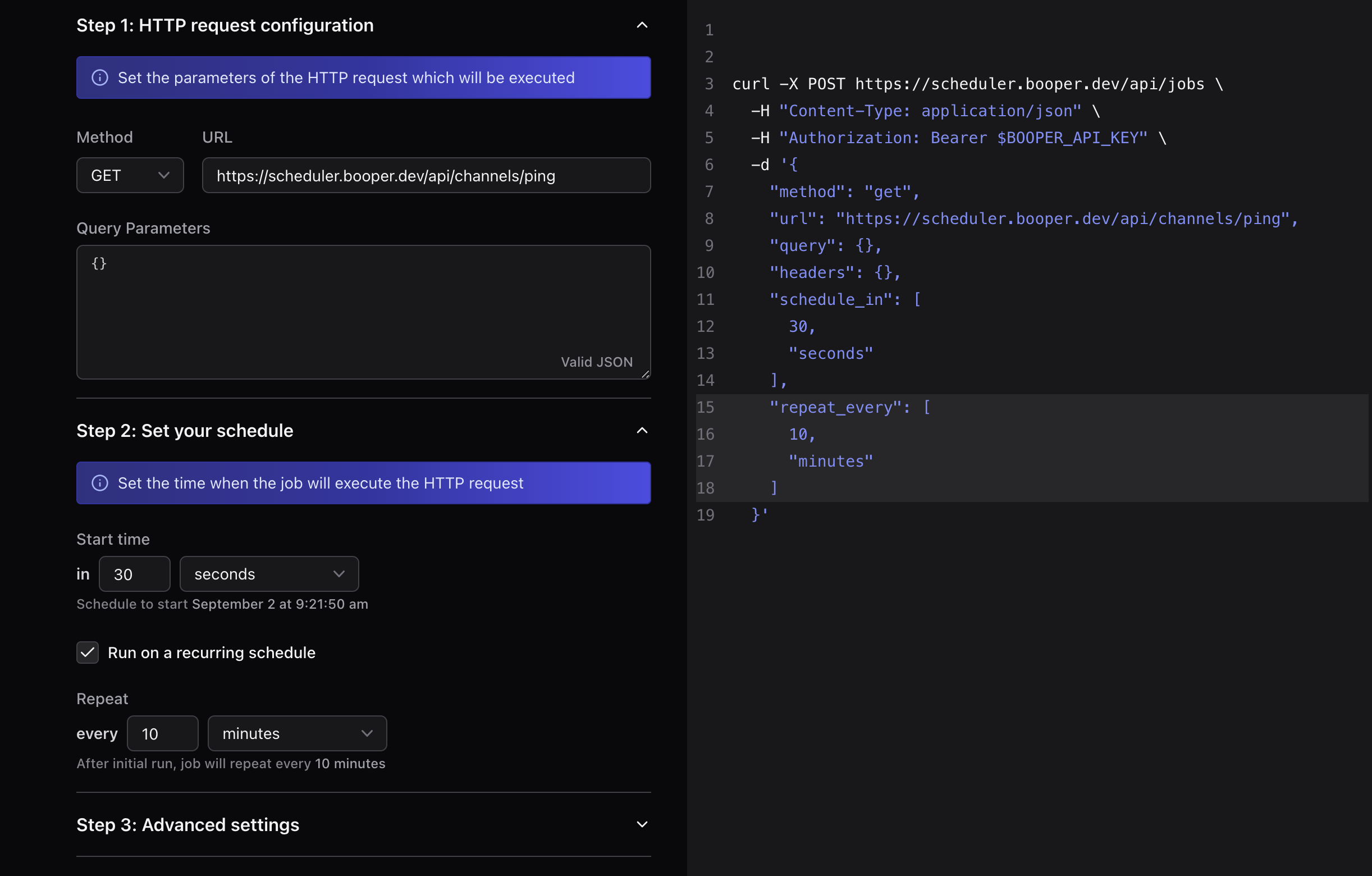 (You can also use the public API key in the public [dashboard](https://www.booper.dev/g/home) to create a recurring job.)
### With an SDK
If you want to trigger a recurring job from your codebase, you can use one of our SDKs, or simply make a request to the API with the HTTP library of your choice.
Let's use our NodeJS SDK for example. First, install the `@booper/scheduler` package:
```bash npm theme={null}
npm i @booper/scheduler
```
```bash yarn theme={null}
yarn add @booper/scheduler
```
Then, in your server code, make sure to set the `repeat_every` field:
```typescript theme={null}
import Scheduler from "@booper/scheduler";
const BOOPER_API_KEY = "sk_public_20230921";
const scheduler = new Scheduler({ apiKey: BOOPER_API_KEY });
(async () => {
await scheduler.jobs.create({
method: "get",
url: "https://scheduler.booper.dev/api/ping",
schedule_in: [10, "seconds"],
repeat_every: [5, "minutes"],
});
})();
```
(You can also use the public API key in the public [dashboard](https://www.booper.dev/g/home) to create a recurring job.)
### With an SDK
If you want to trigger a recurring job from your codebase, you can use one of our SDKs, or simply make a request to the API with the HTTP library of your choice.
Let's use our NodeJS SDK for example. First, install the `@booper/scheduler` package:
```bash npm theme={null}
npm i @booper/scheduler
```
```bash yarn theme={null}
yarn add @booper/scheduler
```
Then, in your server code, make sure to set the `repeat_every` field:
```typescript theme={null}
import Scheduler from "@booper/scheduler";
const BOOPER_API_KEY = "sk_public_20230921";
const scheduler = new Scheduler({ apiKey: BOOPER_API_KEY });
(async () => {
await scheduler.jobs.create({
method: "get",
url: "https://scheduler.booper.dev/api/ping",
schedule_in: [10, "seconds"],
repeat_every: [5, "minutes"],
});
})();
```