> ## Documentation Index
> Fetch the complete documentation index at: https://docs.booper.dev/llms.txt
> Use this file to discover all available pages before exploring further.
# Product update announcements
> Schedule product update announcement emails
### Overview
We can use a scheduled job to run every Monday morning to send out a product announcement email if any new release is detected.
For the sake of simplicity, we're going to use the public GitHub API to check the latest published release of an open source project to demonstrate how this might work.
See the finished code on [Replit](https://replit.com/@reichertjalex/product-update).
You can even use the Replit URL to run your job, as long as the Repl is running. Make sure to replace `YOUR_EMAIL_ADDRESS` with a valid email address and `YOUR_RESEND_API_KEY` with your [Resend API key](https://resend.com/api-keys), and then you can run the following in your terminal:
```bash cURL theme={null}
# This assumes your API key is set in the current env
# BOOPER_API_KEY=sk_...
curl --location --request POST 'https://scheduler.booper.dev/api/jobs' \
--header "Content-Type: application/json" \
--header "Authorization: Bearer $BOOPER_API_KEY" \
--data-raw '{
"method": "post",
"url": "https://product-update.reichertjalex.repl.co/api/run",
"body": {
"owner": "supabase",
"repo": "supabase",
"recipient": YOUR_EMAIL_ADDRESS,
"resend_api_key": YOUR_RESEND_API_KEY,
"last_sent_release": "$state.last_sent_release"
},
"cron": "0 10 * * MON"
}'
```
```bash CLI theme={null}
npx @booper/cli run \
POST https://product-update.reichertjalex.repl.co/api/run \
--data 'owner=supabase'
--data 'repo=supabase'
--data "recipient=$YOUR_EMAIL_ADDRESS" \
--data "resend_api_key=$YOUR_RESEND_API_KEY" \
--data 'last_sent_release=$state.last_sent_release' \
--cron '0 10 * * MON'
```
### Checking a project's latest release
We can use use the following [API endpoint](https://docs.github.com/en/rest/releases/releases?apiVersion=2022-11-28#get-the-latest-release) to get the latest release for a project, given the GitHub `owner` and `repo` names:
```
https://api.github.com/repos/{owner}/{repo}/releases/latest
```
For this example, we're going to use Supabase's main repository: [https://github.com/supabase/supabase](https://github.com/supabase/supabase)
We can see the latest release data here:
[https://api.github.com/repos/supabase/supabase/releases/latest](https://api.github.com/repos/supabase/supabase/releases/latest)
We're going to use the `name` and `body` markdown field for our email notification, and the release `id` to reference the last notification that was sent.
Here's how we could retrieve that data in TypeScript:
```ts TypeScript theme={null}
const fetchLatestRelease = async (owner: string, repo: string) => {
const url = `https://api.github.com/repos/${owner}/${repo}/releases/latest`;
return fetch(url).then((r) => r.json());
};
```
```js JavaScript theme={null}
const fetchLatestRelease = async (owner, repo) => {
const url = `https://api.github.com/repos/${owner}/${repo}/releases/latest`;
return fetch(url).then((r) => r.json());
};
```
### Triggering emails for new releases
Now what we want to do is:
1. Fetch the latest release of the repository using the `fetchLatestRelease` function above.
2. Use the schedule's `state` to store the ID of last sent release, which we check against the current latest release.
3. If the current latest release is different from the last sent release, we trigger an email to be sent out to the recipients of our choosing.
Here we handle that in a [NextJS API endpoint](https://nextjs.org/docs/pages/building-your-application/routing/api-routes), using [Resend](http://resend.com/) to as our email API:
```ts pages/api/announcements.ts (NextJS) theme={null}
import { Resend } from "resend";
export default async function handler(req, res) {
const { owner, repo, recipients, last_sent_release } = req.body;
const release = await fetchLatestRelease(owner, repo);
if (!release || !release.name || !release.body) {
return res.status(404).json({ error: "Not found." });
} else if (release.id === last_sent_release) {
return res.status(200).json({ message: "This release was already sent." });
}
// Get your free Resend API key at https://resend.com/api-keys
const resend = new Resend(process.env.RESEND_API_KEY);
const email = await resend.sendEmail({
from: `${repo}@resend.dev`,
to: recipients,
subject: release.name,
text: release.body,
});
// Use the special keyword `$set` to cache the the `last_sent_release`
// on the schedule's state for reference in future jobs
return res.json({ email, $set: { last_sent_release: release.id } });
}
```
```js app.js (NodeJS) theme={null}
import express from "express";
import { Resend } from "resend";
const app = express();
app.use(express.json());
app.post("/api/announcements", async (req, res) => {
const { owner, repo, recipients, last_sent_release } = req.body;
const release = await fetchLatestRelease(owner, repo);
if (!release || !release.name || !release.body) {
return res.status(404).json({ error: "Not found." });
} else if (release.id === last_sent_release) {
return res.status(200).json({ message: "This release was already sent." });
}
// Get your free Resend API key at https://resend.com/api-keys
const resend = new Resend(process.env.RESEND_API_KEY);
const email = await resend.sendEmail({
from: `${repo}@resend.dev`,
to: recipients,
subject: release.name,
text: release.body,
});
// Use the special keyword `$set` to cache the the `last_sent_release`
// on the schedule's state for reference in future jobs
return res.json({ email, $set: { last_sent_release: release.id } });
});
app.listen(process.env.PORT || 3000, () => console.log("Server initialized!"));
```
Note that in the reponse we use the special `$set` key to update the `state`
of the job schedule, so that we can reference the `last_sent_release` ID in
future jobs.
The code above will trigger an email of plaintext/markdown, which isn't ideal. Let's use [react-email](https://github.com/resendlabs/react-email) and [react-markdown](https://github.com/remarkjs/react-markdown) to send a prettier email!
### Formatting the email HTML
Right now our email is just getting sent in plaintext markdown:
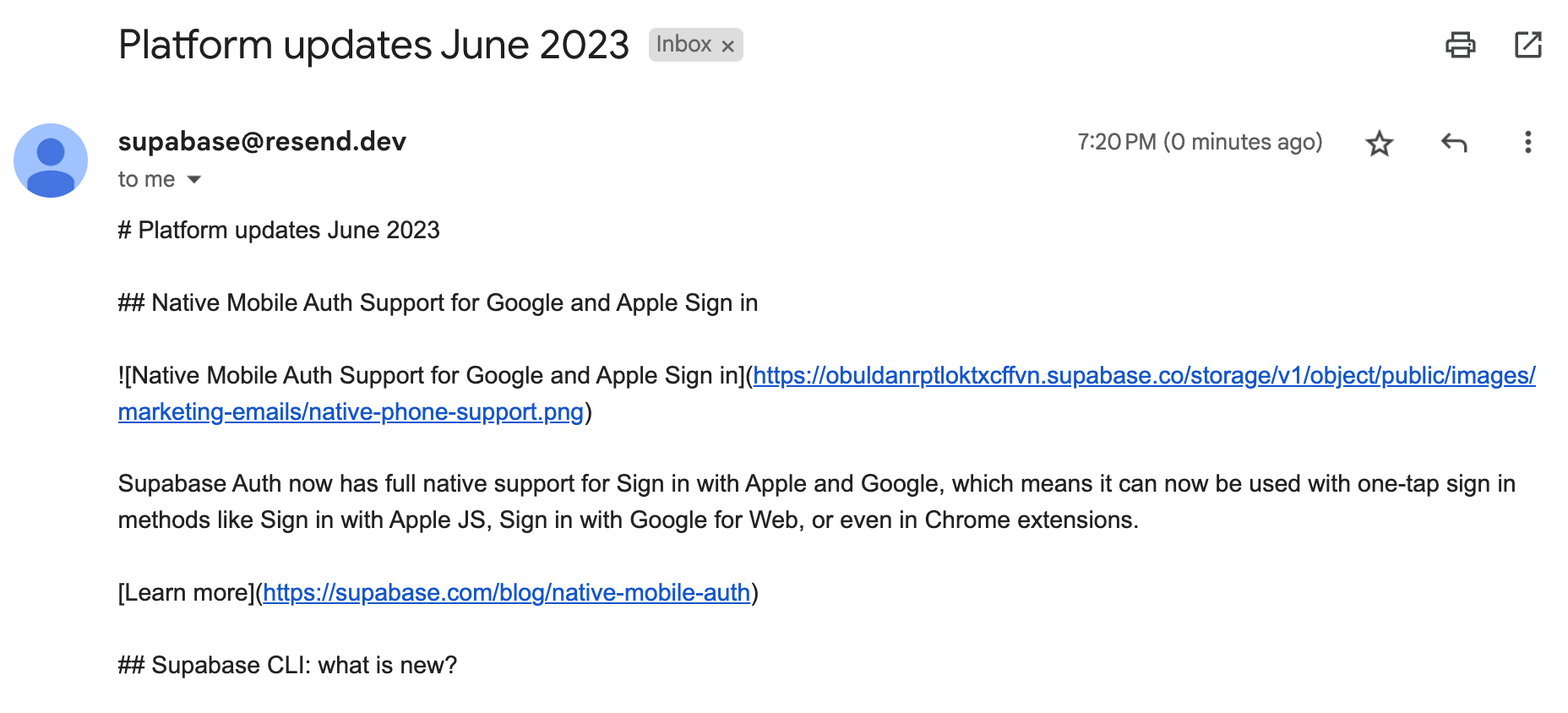 If we want to send some nicer HTML, we can use [react-markdown](https://github.com/remarkjs/react-markdown) to handle parsing the markdown to React, and [react-email](https://github.com/resendlabs/react-email) to handle rendering a React component as the email.
First, let's define a React component to render our markdown email:
```tsx /components/emails/MarkdownEmail.tsx theme={null}
import * as React from "react";
import {
Body,
Container,
Head,
Heading,
Hr,
Html,
Img,
Link,
Tailwind,
Text,
} from "@react-email/components";
import ReactMarkdown from "react-markdown";
export const MarkdownEmail = ({ markdown }: { markdown: string }) => {
return (
If we want to send some nicer HTML, we can use [react-markdown](https://github.com/remarkjs/react-markdown) to handle parsing the markdown to React, and [react-email](https://github.com/resendlabs/react-email) to handle rendering a React component as the email.
First, let's define a React component to render our markdown email:
```tsx /components/emails/MarkdownEmail.tsx theme={null}
import * as React from "react";
import {
Body,
Container,
Head,
Heading,
Hr,
Html,
Img,
Link,
Tailwind,
Text,
} from "@react-email/components";
import ReactMarkdown from "react-markdown";
export const MarkdownEmail = ({ markdown }: { markdown: string }) => {
return (